Skip to content
ReShuffle 2.1.2 for Windows · now with Natural Mode

Your playlist, perfectly reshuffled.

Spread your featured artists at exact intervals, lock your top tracks and clean out duplicates. Free on Windows and on the web.

See pricing
  • Free plan, no card
  • VirusTotal clean
  • Local DPAPI encryption
  • Secure checkout via Paddle
Original order
  1. Marea bajaLúa Marín
  2. PostalIris Moon
  3. Neón lentoTeo Vance
  4. Kilómetro 0Lúa Marín
  5. AzoteaCala Ríos
  6. SalDani Sol
  7. Hilo rojoBruno Ordaz
  8. VértigoTeo Vance
  9. MadrugadaMar Ferrer
  10. EcoIris Moon
  11. Cuarto crecienteLúa Marín
  12. FaroCala Ríos
  13. PolaroidKai Loren
  14. DesiertoBruno Ordaz
  15. OlaDani Sol
  16. PausaMar Ferrer

ReShuffle live · fictional artists

Product facts

4
plans, from $0 forever
Free · Standard · Premium · Ultra
10
featured artists with tiers
ReShuffle · Ultra
500+
tracks reordered keeping “Added by”
Natural Mode
25
first slots of Spotify’s Shuffle buffer
Shuffle Boost

Watch it work before you sign up.

Three interactive demos with fictional artists. The app does the same with your real playlist.

01 · Before / After

From chaos to exact intervals.

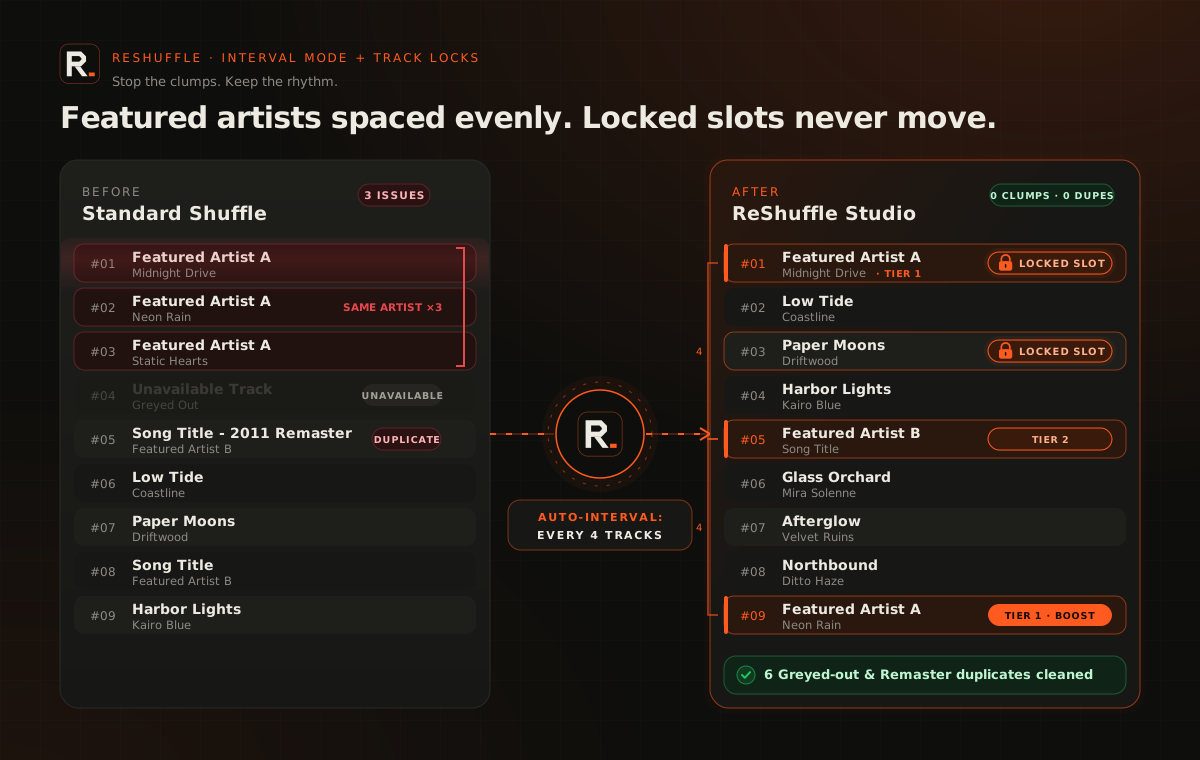
Your featured artists land every 3 tracks, the Top 3 gets locked in place and greyed-out (unavailable) tracks disappear.

Playlist Health Score38/100
  1. 01Midnight RunKairo
  2. 02Paper MoonsLuna Vale
  3. 03Low TideOstra
  4. 04Glass HoursMaren HoltUnavailable
  5. 05Static BloomLuna Vale
  6. 06NorthboundThe Calders
  7. 07Velvet StaticKairo
  8. 08Paper Moons (Remastered)Luna ValeDuplicate
  9. 09AfterglowJuno Park
  10. 10Fever DreamIvy Reyes
  11. 11CoastlineOstraUnavailable
  12. 12WildfireThe Calders
  13. 13HalcyonJuno Park
  14. 14Blue HourSol Ferro
  15. 15UndertowIvy Reyes
—
exact spacing
0
tracks locked
0
tracks cleaned
02 · Natural Mode

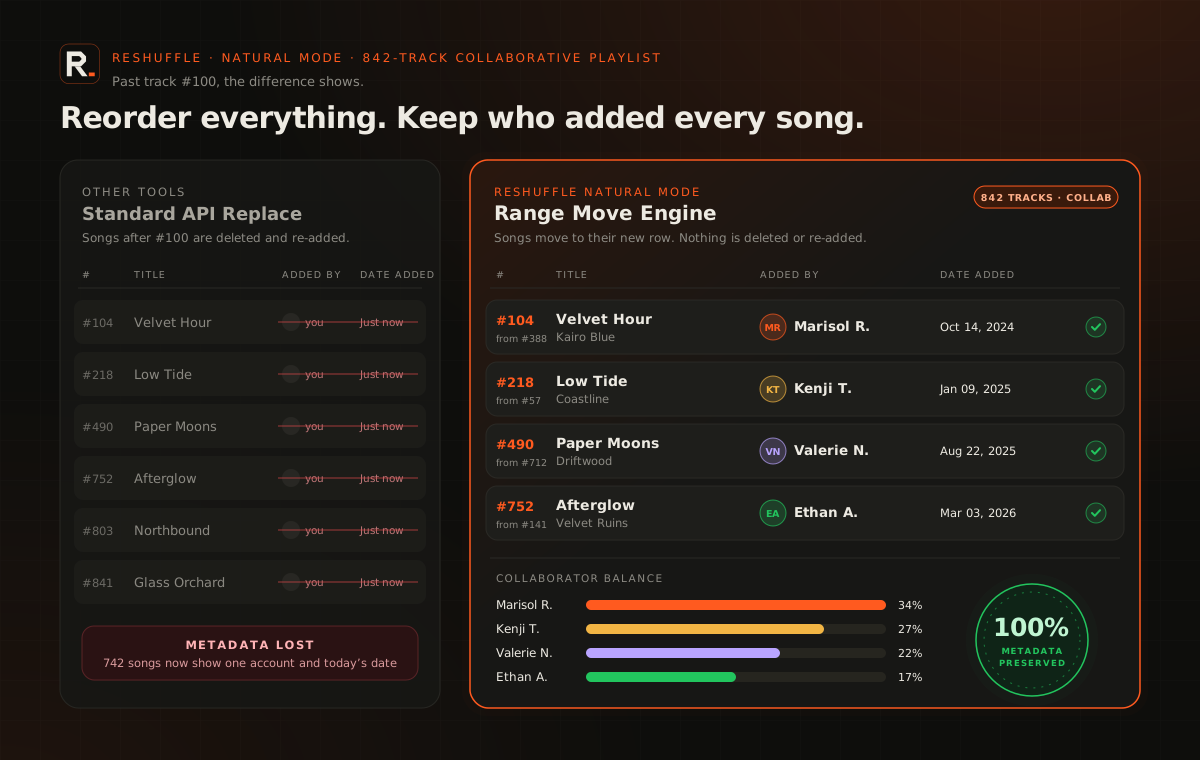
Reorder 500+ tracks without erasing who added them.

Fast mode replaces the list, so Spotify stamps your name and today’s date on everything. Natural Mode moves each track in place: the real collaborator in “Added by” and the original date stay intact.

#TrackAdded byDate
  1. 1Satellite · Kairomaria.k2024-03-02
  2. 2Low Tide · Ostradj_tomas2023-11-18
  3. 3Paper Moons · Luna Valeana.sound2024-07-09
  4. 4Northbound · The Caldersmaria.k2022-05-30
  5. 5Afterglow · Juno Parkleo_beats2025-01-14
  6. 6Velvet Static · Kairodj_tomas2024-09-21


Natural Mode is part of ReShuffle Desktop (Standard and up).

03 · Spotify Shuffle Boost

More presence where Spotify looks first.

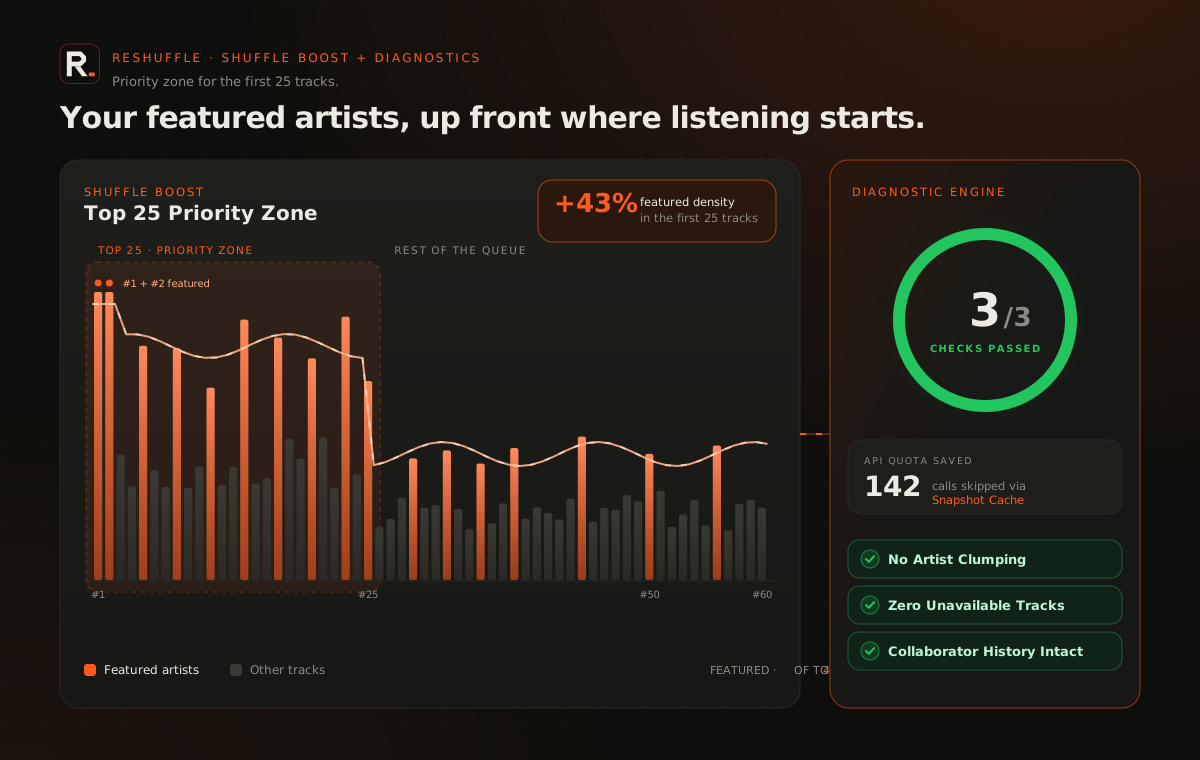
When you hit Shuffle, Spotify builds a buffer from the first tracks. Shuffle Boost reorders so your featured artists fill more of those 25 slots, without stacking them together.

Featured presence16%

First 25 slots of the buffer

  1. 01Kairo
  2. 02Luna Vale
  3. 03Kairo
  4. 04Luna Vale
  5. 05Kairo
  6. 06Luna Vale
  7. 07Kairo
  8. 08Luna Vale
  9. 09Kairo
  10. 10Luna Vale
  11. 11Kairo
  12. 12Luna Vale
  13. 13Kairo
  14. 14Luna Vale
  15. 15Kairo
  16. 16Luna Vale
  17. 17Kairo
  18. 18Luna Vale
  19. 19Kairo
  20. 20Luna Vale
  21. 21Kairo
  22. 22Luna Vale
  23. 23Kairo
  24. 24Luna Vale
  25. 25Kairo

Illustrative simulation. Spotify decides the final Shuffle order; ReShuffle doesn’t guarantee plays.

Web App or Desktop? Both come with your account.

Try everything in the browser. When your playlists grow, ReShuffle Desktop takes over.

FeatureWeb AppWindows Desktop
Health Score, duplicates & Collaborator BalanceIncludedIncluded
Interval Mode & Track Locks previewIncludedIncluded
Apply changesFast Mode · 150 tracks (Free) or 600 (paid)Any size
Natural Mode (keeps “Added by” and dates)Not includedIncluded
Multi-Source MixerNot includedIncluded
Release Radar InboxNot includedIncluded
Windows Auto-RenewNot includedIncluded
Local DPAPI encryptionNot includedIncluded
Both are free to start

ReShuffle

Your artists, evenly spread.

Mark each artist as Feature, Normal or Filler, pick a mode and see the result before touching Spotify. What you see in the preview is exactly what gets applied.

Skip the tour

Inside, in four steps.

ReShuffle Studio for Windows, step by step. Your data stays on your computer.

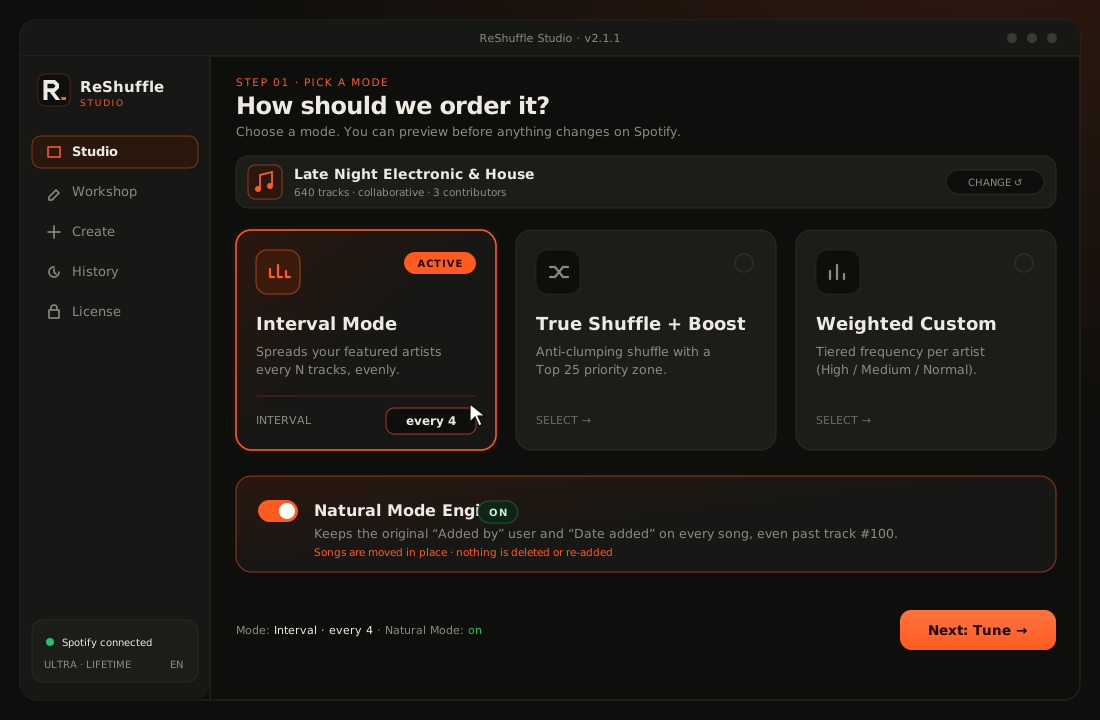
  1. 01Pick a mode

    Interval, Shuffle or Custom: each one spreads your artists with its own rule.

    ReShuffle Studio, step 1: the mode picker with Interval Mode selected and the Natural Mode engine turned on.
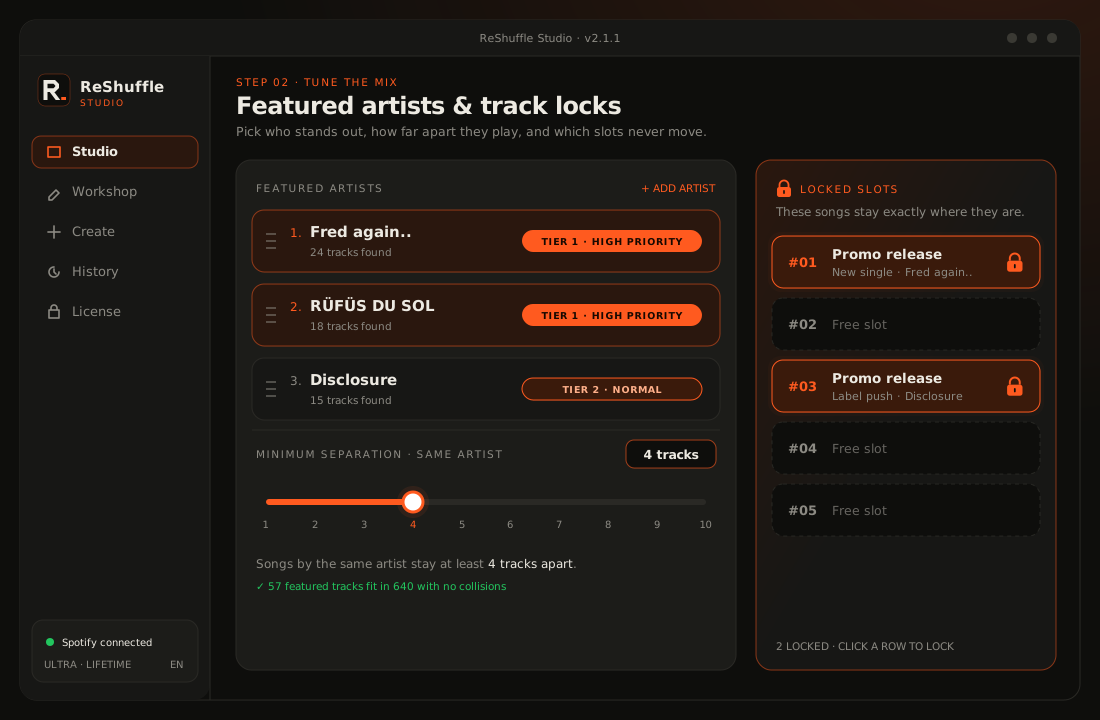
  2. 02Tune the mix

    Pick your featured artists and their tiers, set the minimum separation and lock the tracks that must not move.

    ReShuffle Studio, step 2: featured artists with tiers, a minimum separation of 4 tracks and locked slots #01 and #03.
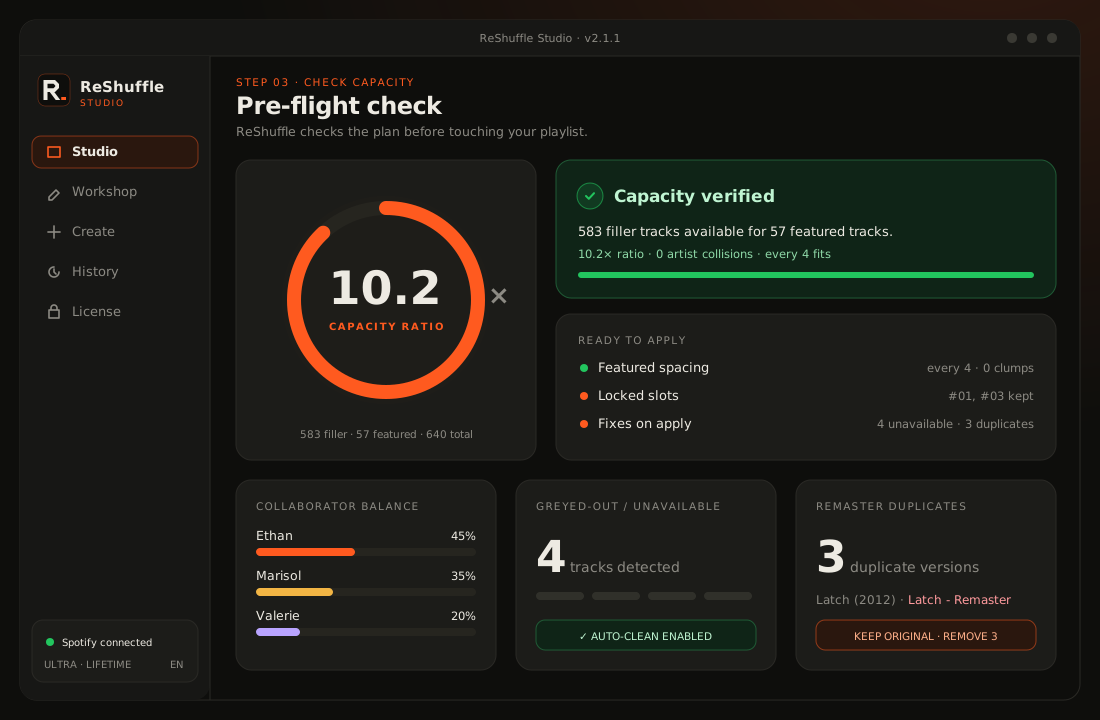
  3. 03Check capacity

    Before changing anything, it tells you whether your songs are enough for the gap you asked for, and the largest gap possible.

    ReShuffle Studio, step 3: pre-apply diagnostics with a 10.2x capacity ratio, collaborator balance, unavailable tracks and remaster duplicates.
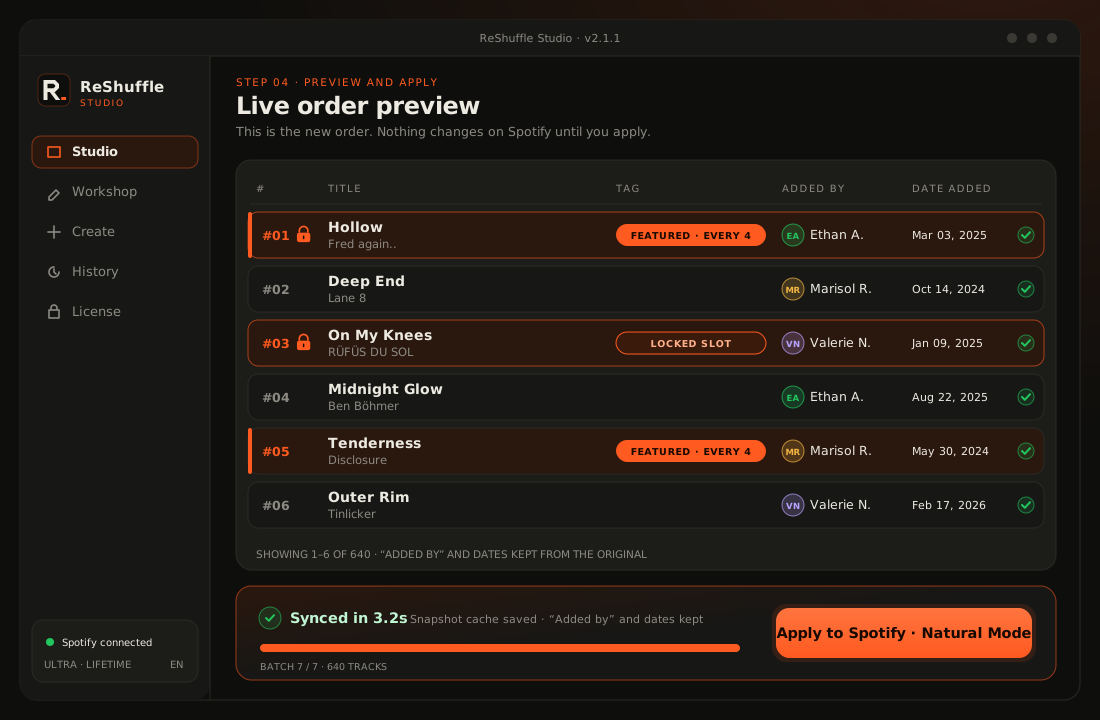
  4. 04Preview and apply

    See how it would look and, once you like it, apply it to your Spotify playlist.

    ReShuffle Studio, step 4: live order preview of tracks #01 to #06 with locks, featured badges and preserved “Added by”, and the Apply to Spotify bar.
See pricing
Try the modes

Always the same spacing; whatever is left goes at the end.

Variant
Spacing
2tracks

Enough capacity: you have 11 filler tracks and need 8.

Illustrative simulation with fictional artists. The app works on your real playlist.

#Track · Artist
  1. Marea bajaLúa Marín
  2. PostalIris Moon
  3. AzoteaCala Ríos
  4. Neón lentoTeo Vance
  5. SalDani Sol
  6. Hilo rojoBruno Ordaz
  7. Kilómetro 0Lúa Marín
  8. MadrugadaMar Ferrer
  9. EcoIris Moon
  10. VértigoTeo Vance
  11. FaroCala Ríos
  12. PolaroidKai Loren
  13. Cuarto crecienteLúa Marín
  14. DesiertoBruno Ordaz
  15. OlaDani Sol
  16. PausaMar Ferrer

Are your songs enough?

Enter your playlist's numbers. An artist with m songs and a gap of g needs (m − 1) × g + 1 positions.

songs

Your songs are enough

Songs
503
Minimum needed
201
Largest possible gap
12

This is how ReShuffle checks before touching your playlist.

  1. Per-artist levels

    Reads every artist in the playlist and lets you mark each one as Feature, Normal or Filler.

  2. Capacity calculator

    Before applying, it tells you whether you have enough filler tracks for the spacing you asked for, and how many are missing.

  3. Apply without surprises

    Checks the connection before writing and retries on its own if it fails. If the internet drops, it tells you how many tracks it managed to write.

  4. Your account, in sight

    Shows which Spotify account you're connected as and lets you disconnect to switch accounts.

  5. A license that moves with you

    Move your license to another computer yourself up to 2 times. After that, just ask by email.

  6. Credentials stay on your PC

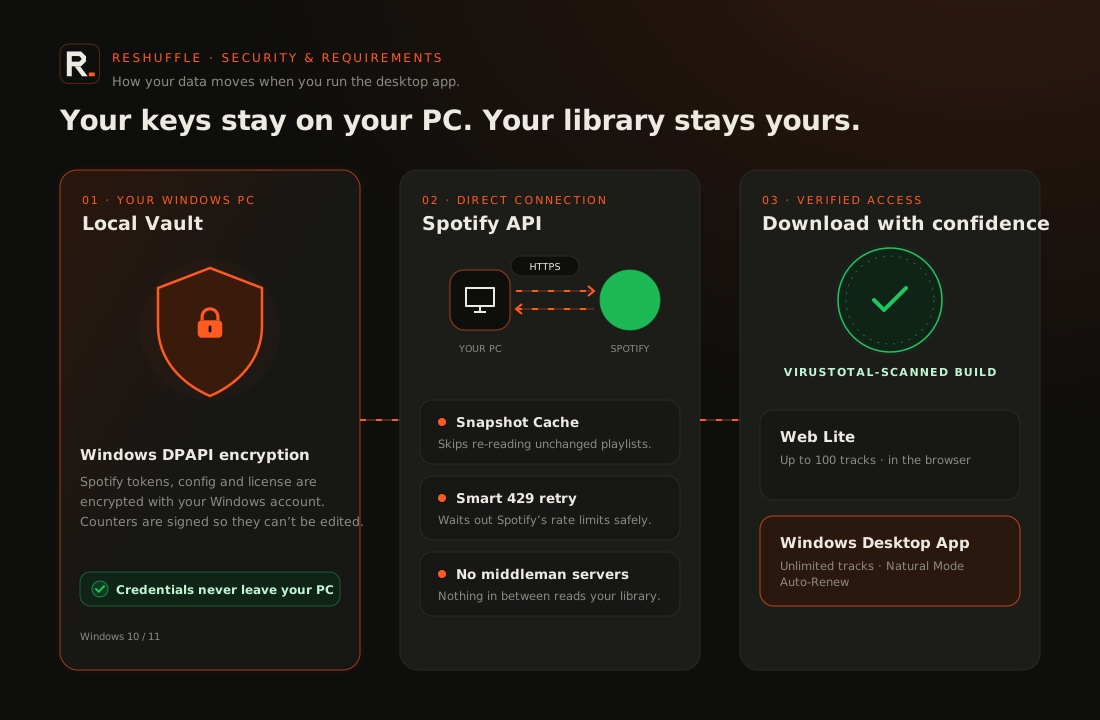
    Your Spotify credentials are stored only on your computer.

Start free. Upgrade when you’re ready.

One account, one license: it works in the Windows app and in the Web App.

Prices in US dollars (USD)

Free

$0USD

Forever

  • 2 changes per day
  • Playlists up to 100 tracks
  • 50 API calls per day
  • Interval Mode
  • Windows app + Web App
  • Natural Mode

Standard

$4.99USD

30 days

  • 15 changes per day
  • No playlist size limit
  • Natural Mode (keeps “Added by”)
  • Exact and Spread Interval
  • 3 featured artists
  • Shuffle Boost

Premium

Most popular

$9.99USD

30 days

  • 100 changes per day
  • Everything in Standard
  • Spotify Shuffle Boost
  • Track Locks
  • 5 featured artists

Ultra

$39USD

One-time · lifetime

  • Unlimited changes forever
  • Everything in Premium
  • 10 featured artists with tiers
  • Unlimited API calls
  • VirusTotal cleanCheck the installer yourself on virustotal.com.
  • Local encryptionYour Spotify credentials are encrypted on your PC with Windows DPAPI.
  • Secure payment via PaddleCard, Apple Pay or Google Pay. Paddle is the merchant of record.
  • Instant activationYour plan is activated on your account as soon as the payment clears.

How it works

  1. 01Create your free account

    Verify your email with a 6-digit code and get your Free license instantly.

  2. 02Upgrade any time

    Pay in Paddle’s secure overlay without leaving this page. Prices in USD.

  3. 03Instant activation

    Your key updates on its own. Sign in to the Windows app with your email or your key.

    ReShuffle Studio with the live order preview and the Apply to Spotify bar.

Standard and Premium renew every 30 days through Paddle, and you can cancel any time from the receipt in your inbox. If a plan ends, your account goes back to Free: you never lose access.

Check the requirements before upgrading.

Questions? Email us at soporte@aearturservices.com

Check this before you buy.

No surprises. ReShuffle only works if everything on this list applies to you.

  • Windows

    Its own installer, no admin rights needed. Uninstall from “Add or remove programs”. There is no Mac version.

  • Always online

    The license is checked every hour and the app reads and writes your playlists directly on Spotify.

  • A Spotify developer app

    A free app at developer.spotify.com that you create (Client ID and Client Secret). ReShuffle walks you through it.

  • Only your own or collaborative playlists

    Spotify only allows reordering playlists you own or collaborate on.

  • Spotify Premium account required

    Spotify requires it for apps in development mode. The owner of the developer app needs Premium, and each app allows at most 5 users.

  • Correct PC clock

    If the date and time are far off, the app asks you to verify the license again.

Spotify developer app rules in effect since February 2026. Spotify may change them.

Security architecture
Credentials encrypted on your Windows PC with DPAPI, the app talking directly to the Spotify API, the build scanned on VirusTotal, and Web Lite compared with the Windows desktop app.

“Windows protected your PC”

ReShuffle isn't digitally signed, so Windows may show this warning the first time. The app explains how to continue, and we recommend checking the file on virustotal.com.

ReShuffle is not affiliated with or endorsed by Spotify. Spotify is a trademark of Spotify AB.

Runs on

  • Windows
  • Spotify Web API
  • Cloudflare
  • Paddle

FAQ

No. ReShuffle reorders your playlist, nothing more. It doesn't promise more plays, more income or any advantage in Spotify's algorithm.

Yes, forever and with no card: 2 changes per day on playlists up to 100 tracks and 50 API calls per day, in the Windows app and in the Web App.

By card, Apple Pay or Google Pay through Paddle, our merchant of record. Your plan is activated on your account automatically as soon as the payment clears.

The Web App analyzes your playlists and applies changes in Fast Mode: up to 150 tracks on Free and 600 on paid plans. ReShuffle Desktop processes huge lists with no browser timeouts, with Natural Mode, Multi-Source Mixer, Release Radar Inbox and local DPAPI encryption. Both come with the same account.

Yes. You can move it yourself up to 2 times. After that, ask by email.

With the same email and password as your account, or by pasting your key, which you’ll find under “My Account”.

Only on your computer, encrypted with Windows DPAPI.